
Connect Flowfact CRM with BOTTIMMO
1) Create an API key in Flowfact
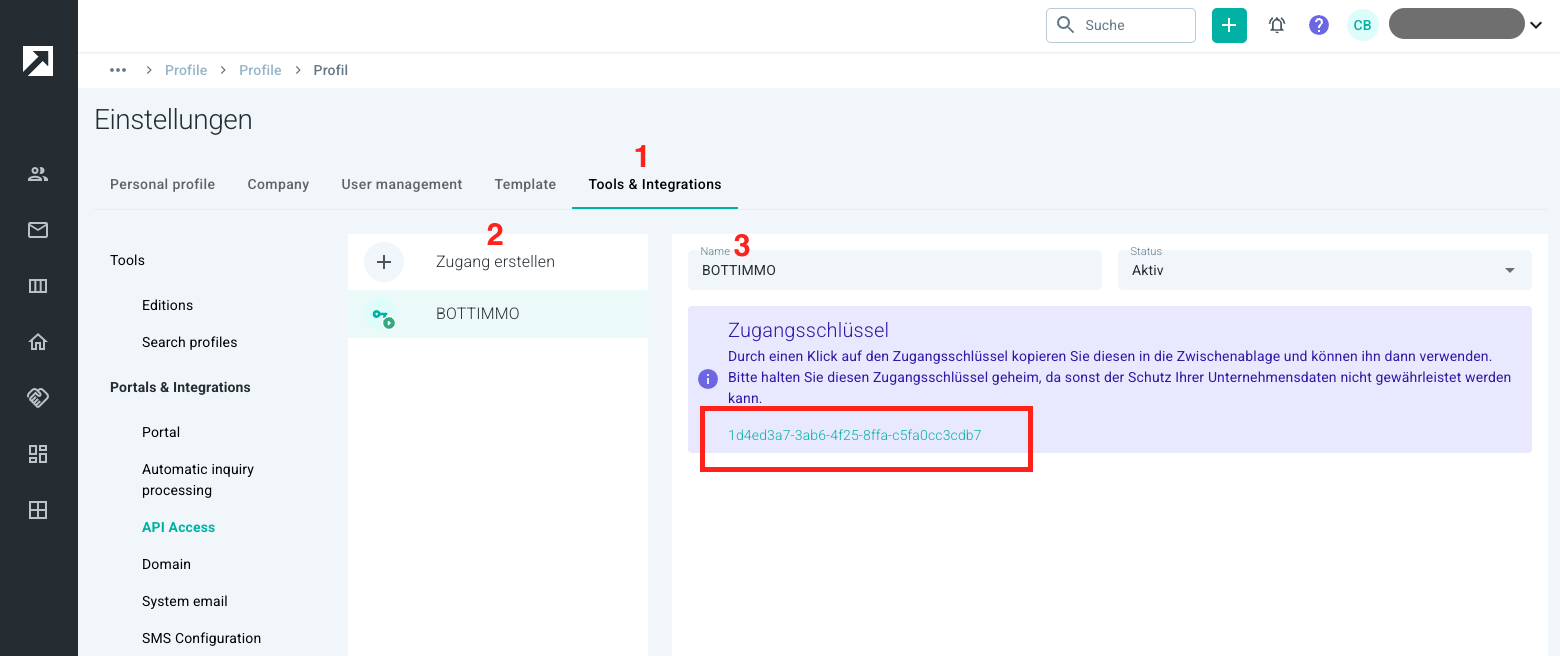
To connect the two systems and ensure secure data transfer, first create an API key by opening your Flowfact account at the following page: https://apps.flowfact.com/settings/apiAccess
- Click on Create access
- Enter BOTTIMMO as the name
- An access key will be generated for you (purple box)
- Copy this key to your clipboard
2) Enter the API key in BOTTIMMO
- Now open BOTTIMMO
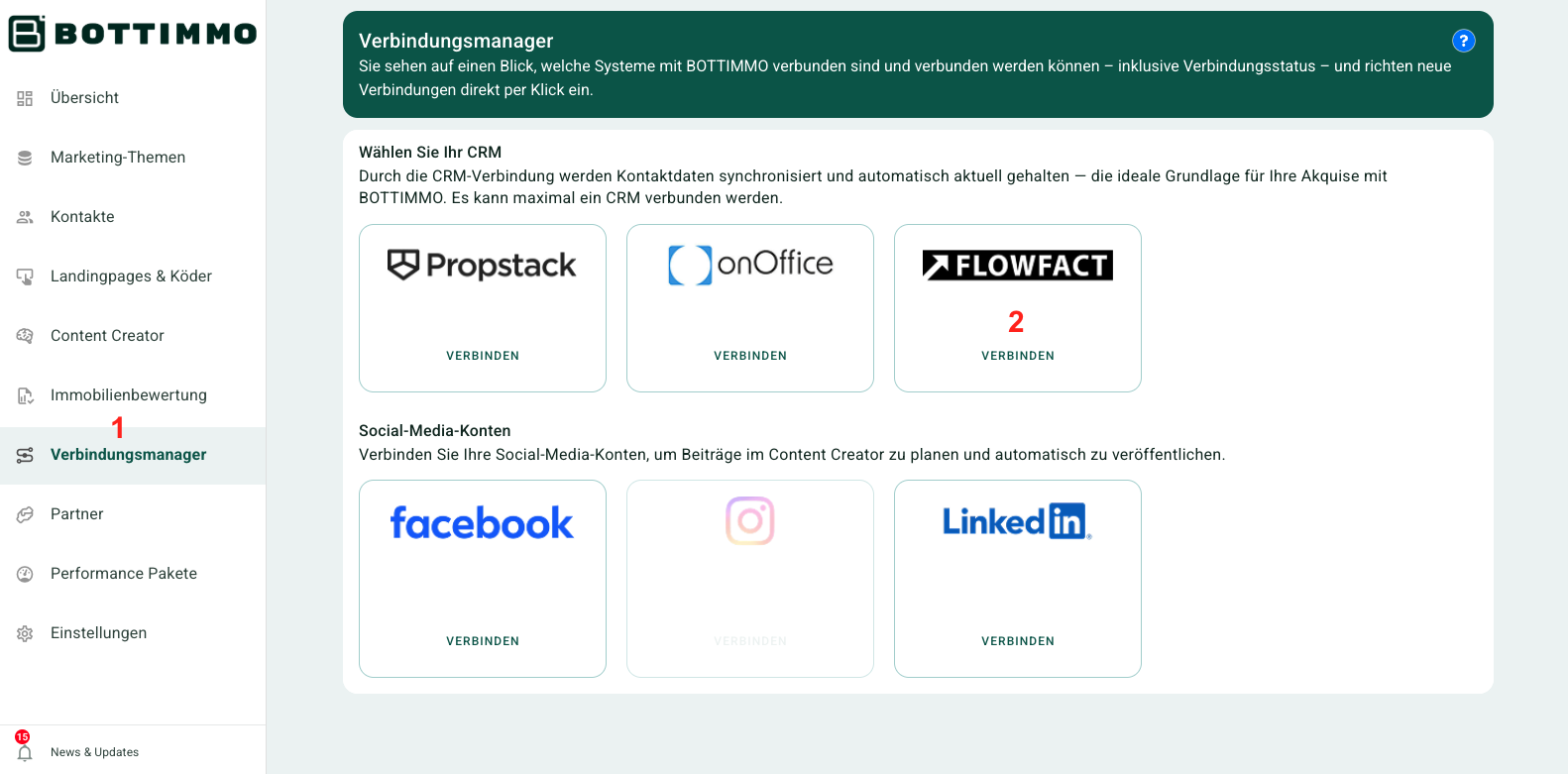
- Select Connection Manager from the left-hand navigation
- In the Flowfact tile, click Connect
- Then follow the instructions of the connection assistant.
The setup is now completed quickly and easily.
Synchronisation of contact data with Flowfact
Four different synchronisation modes are available for the connection between BOTTIMMO and Flowfact. This allows you to decide how your contact data is transferred.
1. Manual export only
Each contact is exported individually from the contact detail page in BOTTIMMO to Flowfact.
There is no automatic data exchange.
No contacts are imported from Flowfact into BOTTIMMO.
This mode is suitable if you want to retain full control over each individual export.
2. Automatic export to CRM only
All newly generated contacts in BOTTIMMO are automatically transferred to Flowfact.
No import from Flowfact takes place.
This mode ensures that new leads are stored directly in your CRM (Customer Relationship Management system).
3. Automatic import from CRM only
Contacts are automatically imported from Flowfact into BOTTIMMO.
Export from BOTTIMMO to Flowfact takes place manually only.
This mode is suitable if Flowfact is your central data source and BOTTIMMO is used as a complementary system.
4. Automatic import and export
In this mode, a fully automatic data exchange takes place in both directions.
All contacts remain synchronised between Flowfact and BOTTIMMO.
Data authority always remains with the CRM.
This means: BOTTIMMO does not overwrite or delete any data in Flowfact. Only missing information is added.
This mode offers the highest level of convenience and ensures permanently up-to-date contact data in both systems.
Can the synchronisation be stopped again?
Yes, the connection can be disconnected in the Flowfact tile within the Connection Manager.
What happens if synchronisation is stopped?
From that moment on, no further data will be transferred between Flowfact and BOTTIMMO.
ℹ️ Info: Synchronisation can be stopped and restarted at any time with a single click.
What data is synchronised between BOTTIMMO and FLOWFACT?
When you connect BOTTIMMO with FLOWFACT, many pieces of information are automatically exchanged between the two systems. This means you do not have to enter data twice and you can keep track of all contacts and activities in one place. Below you will find a simple overview of which data is transferred.
1. Contact data from BOTTIMMO to FLOWFACT
BOTTIMMO automatically creates a contact in FLOWFACT or supplements existing data. The following information is transferred:
- First name and surname of the prospect
- Email address
- Telephone number (including indication whether it is a mobile number)
- Tags (keywords, e.g. “bottimmo” is always added)
- GDPR status, if available
- Contact status (“active”)
- Follow-up date: If a due date exists in the lead (contact in BOTTIMMO), it is stored as a follow-up in FLOWFACT
- All emails provided by the lead
- Direct link to the contact in FLOWFACT
- The FLOWFACT contact ID (if already available)
2. Activities and notes for each conversion
A “conversion” is an action performed by the prospect. Examples: started a valuation, requested a callback, downloaded a guide.
- For each such action, BOTTIMMO automatically creates an activity (note) in FLOWFACT. This includes:
- A title (e.g. name of the landing page or type of action)
- A short description
- Date and time of the action
- The name of your company (as stored in BOTTIMMO)
- A link to the lead in BOTTIMMO
- If a contact has been deleted in BOTTIMMO, a deletion note is stored
3. Data depending on the type of conversion
Depending on the prospect’s action, different information is transferred. Here is an easy-to-understand overview:
- Property valuation
- Property type (e.g. house, flat)