
Measuring campaign success in the BOTTIMMO dashboard
Why is this important?
When you run ads on Google Ads or Facebook Ads, they often lead directly to a BOTTIMMO landing page or a BOTTIMMO widget.
To clearly see later how many contacts were generated through these campaigns, the links in your ads must contain UTM parameters.
UTM parameters are short pieces of information added to a link.
They show your dashboard:
- which campaign a contact came from
- through which network (Google or Facebook)
- through which specific ad
This allows you to clearly recognise which campaign actually brought you new property-owner leads.
Step 1: Use UTM parameters for your campaigns
Add clear UTM parameters to the target links of your Google Ads or Facebook Ads.
Only then can the BOTTIMMO dashboard recognise which campaign a contact came from.
Typical UTM parameters are:
- utm_source: source, e.g. google or facebook
- utm_medium: type of advertising, e.g. cpc (paid ad)
- utm_campaign: name of your campaign
Example of a full URL with UTM parameters
Original URL:
https://it-company.immowissen.org/immobilienbewertung
With UTM parameters, the link could look like this:
https://it-company.immowissen.org/immobilienbewertung?utm_source=google&utm_medium=cpc&utm_campaign=bewertung_kampagne
Explanation:
- utm_source=google
The person came via Google. - utm_medium=cpc
They came via a paid ad. - utm_campaign=bewertung_kampagne
This name helps you distinguish between campaigns later on.
You can choose the campaign name freely. Pick something you can easily recognise in your dashboard.
Step 2: Set the date filter in the dashboard
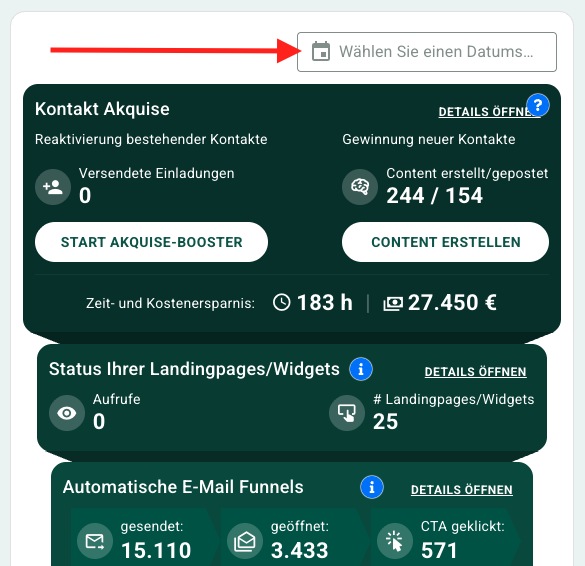
At the top of the dashboard, Expert customers will see the date filter.
Set the time period to match the duration of your campaign.
Only then will all relevant entries appear.
Step 3: View UTM parameters in the dashboard
- Go to the box “Status of your landing pages/widgets” in the dashboard.
- Click on “Open details”.
- A layer opens showing all UTM parameters recorded during this period.
You will immediately see:
how many visitors each parameter brought to your BOTTIMMO content.
Step 4: Easily find contacts
In the same layer, BOTTIMMO shows you how many contacts came from each campaign.
Clicking on the number takes you straight to the contact list – already filtered for exactly these contacts.
This allows you to quickly review all available lead data and plan next steps.