
AI Analysis Assistant for Contacts
The AI analysis on the contact details page provides you with a quick and clear assessment of a contact. This allows you to immediately see how important a contact is and what the next steps should be.
What the AI analysis does
At the press of a button, the BOTTIMMO AI analyses all available data of a contact. This creates a compact analysis with the most important information for your work.
The analysis includes:
- Lead status with scoring
An assessment of how relevant and active the contact is - Most important key information
The crucial point from all the data that you should keep in mind - Contact’s interest
What the contact has specifically shown interest in - Latest activities
The most recent important actions of the contact - Recommended next action including goal
A specific suggestion for what you should do and what goal you can achieve with it
Create the AI analysis for the first time
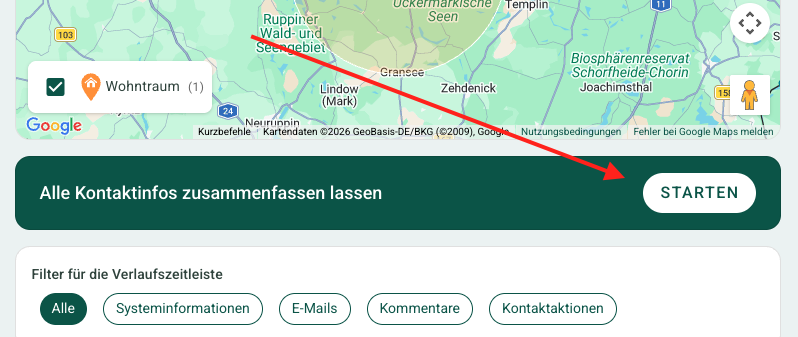
- Open the contact detail page of any contact
- In the section "Have all contact information summarised", click the "START" button
- The analysis is created automatically and then displayed
Update the analysis anytime
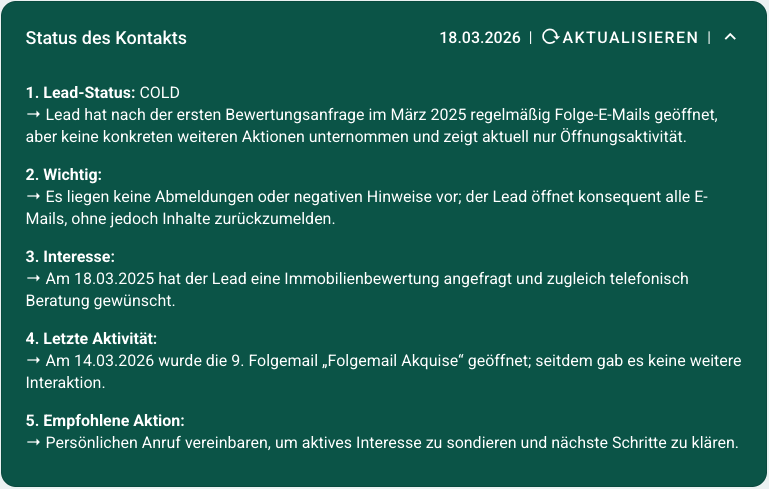
The analysis can be recreated at any time.
This is useful if:
- the last analysis is already several weeks old
- new activities have occurred for the contact
Here is how to do it:
- Look in the green box at the top in the centre for the date of the last analysis
- Click ↻ Update to the right of it.
- The AI immediately creates a new analysis
This keeps your assessment up to date at all times and helps you make better decisions when dealing with your contacts.
Understanding the lead status
The lead status is based on a scoring system.
Scoring is a points-based evaluation that takes a contact’s behaviour into account.
Two factors are considered:
- Type of action (e.g. email opened or enquiry submitted)
- Time between actions (faster responses indicate higher interest)
Examples of points:
- Email opened → +5 points
- Conversion (e.g. enquiry) → +50 points
- Unsubscribed from newsletter → -100 points
Result of the scoring:
- Over 60 points → Hot 🔥 (very high interest)
- Over 20 points → Warm 🌡️ (good interest)
- 1–20 points → Cold ❄️ (low interest)
- 0 points → Lost/Churned 👎🏼 (no longer interested)